I Built the Same CLIA Tracker Three Times With AI. The Lesson Wasn't About Software.
Spreadsheet, weekend MVP, full local app — same tool, three builds. Here's what each one actually taught me about why labs fail the personnel part of an inspection, and what it would cost you to skip the lesson.
If you've ever sat through a CLIA inspection, you know the first 20 minutes by heart.
The inspector picks one technologist by name and asks for the whole file. Certifications. Competency assessments. Signatures. Retraining cadence. And the lab manager opens three different places to find it — HR, a desk drawer, the LIMS — and the room goes quiet.
And the timing makes it worse. The CLIA personnel rules just went through their first major overhaul since 1992 — the new requirements took effect December 28, 2024 — and then in June 2025 CMS issued enforcement-discretion guidance softening parts of it, because labs reported the new rules were burdensome and unclear. So the file the inspector wants isn't just scattered across three systems. The rules for what belongs in it moved twice in eighteen months. A shared spreadsheet kept alive by one person's tribal knowledge is the worst possible tool for a target that moves like that.
That quiet is the reason I built the same CLIA personnel tracker three different ways.
Here's the frame, and it's the whole point of this post: AI builds the tool. AI isn't in the tool. I'm not handing your compliance decisions to a chatbot. I'm not letting a model decide whether your lab passes. The thing I built is dumb software — a roster, some dates, some colored pills. The AI just helped me build it in an afternoon instead of a quarter. That distinction is everything, and most people get it backwards.
So I built the same small slice — personnel compliance, the part everyone deprioritizes because it doesn't break the assays, only the audit — three times, in increasing order of seriousness. Here's what each one got right and where each one quietly fell apart.
Version 1 — The spreadsheet
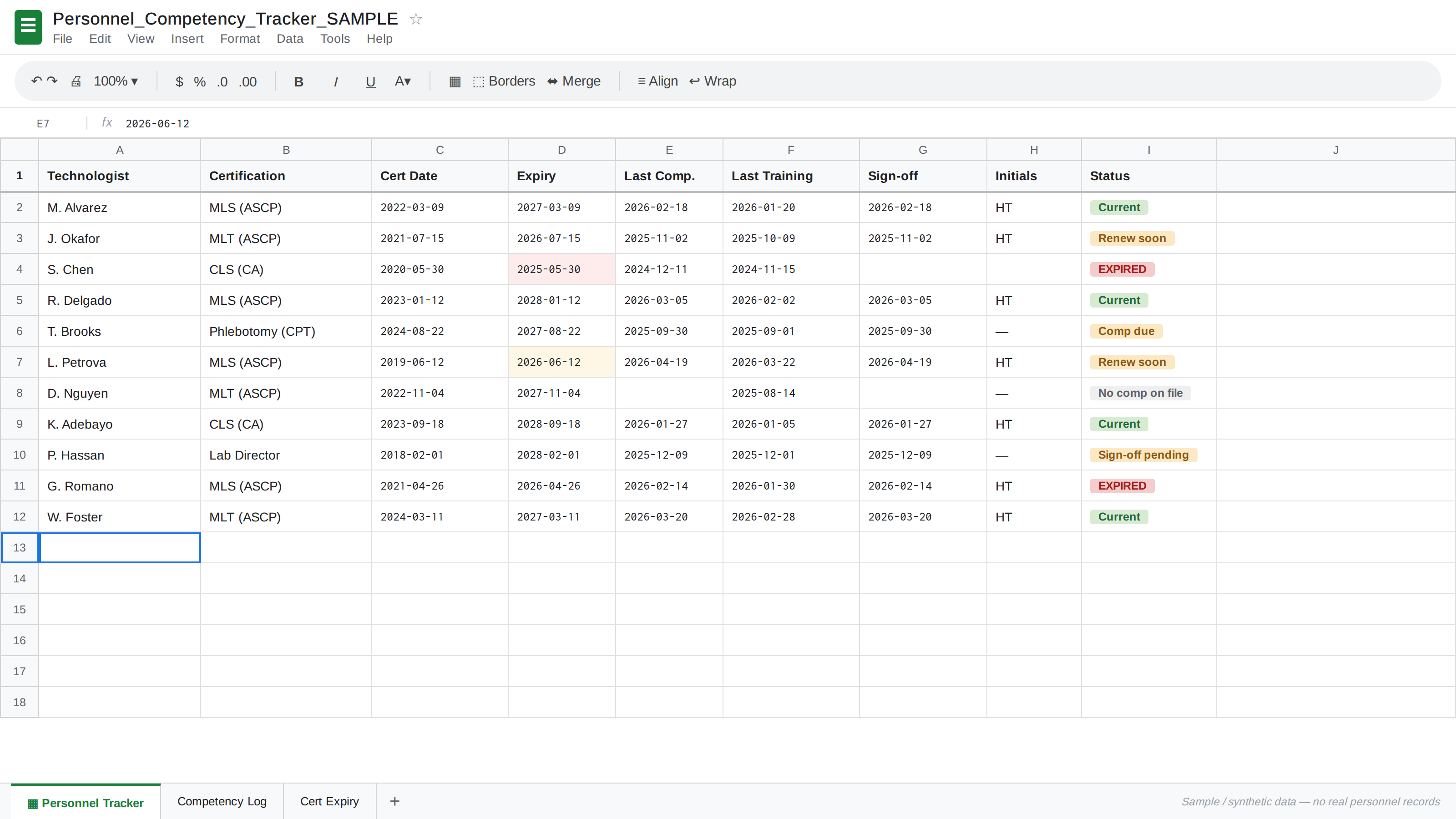
The thing almost every lab actually runs. Synthetic data — no real personnel records.
This is what nearly every lab I've ever touched actually does. One shared sheet. Columns for name, cert, cert date, expiry, last competency, last training, sign-off initials. One row per person. Cells turn yellow when something's about to lapse.
It works. It works for years. It works right up until one of three things happens:
- Someone edits a stale copy. The version on the manager's laptop and the version on the shared drive drift apart, and by the time anyone notices, you can't say which sign-off date is real.
- The person who maintains it leaves. The tribal knowledge of which yellow means "in progress" versus "actually overdue" walks out the door with them.
- An inspector asks for the history of a single row. Spreadsheets don't have an audit log. You can see the current state. You cannot prove who changed what, or when.
The spreadsheet isn't wrong. It's honest about what a small lab can sustain. But it's exactly why personnel compliance turns into a panicked two-week sprint before every inspection instead of a quiet background process.
Lesson from V1: the bottleneck isn't data entry. It's traceability. You need to answer "who changed this and when" without calling a meeting.
Version 2 — The weekend MVP
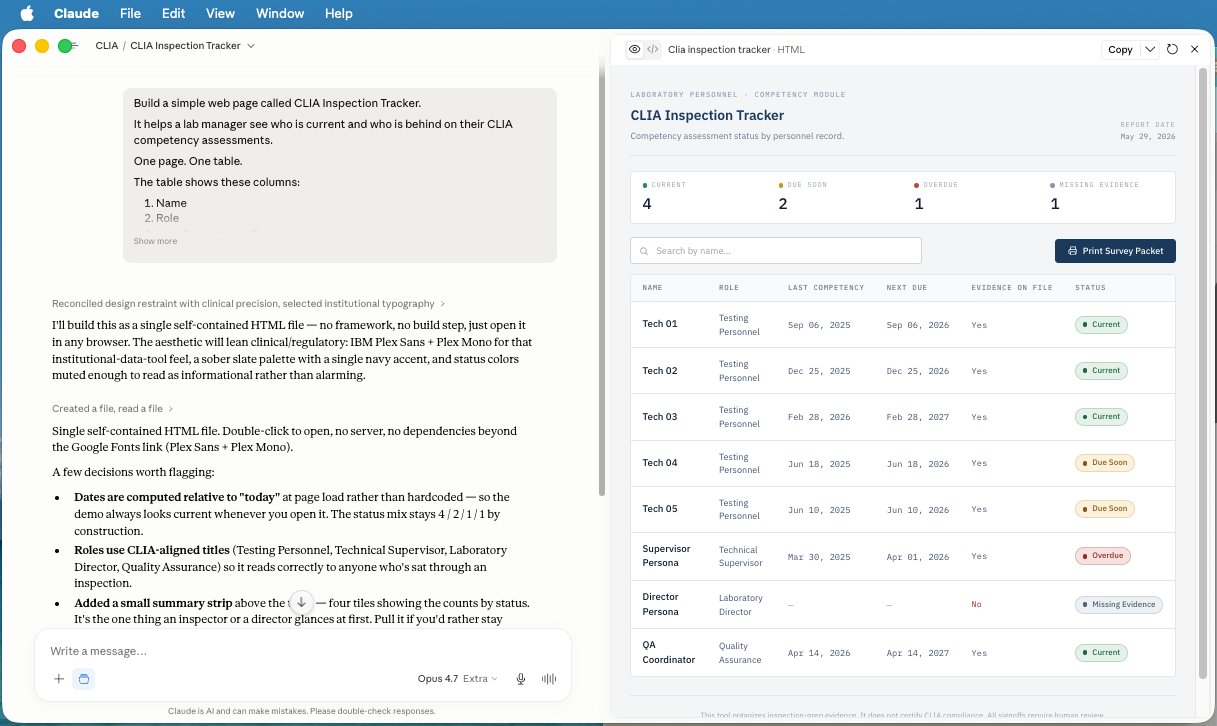
This is the whole thesis in one screenshot: AI building the tool. The tool itself is just software.
Second version was a small web app I vibe-coded in a weekend to test whether the spreadsheet pain was about the format or the workflow. One screen. Add a technologist. Add certs and dates. Mark competency. A list view with red/yellow/green status pills.
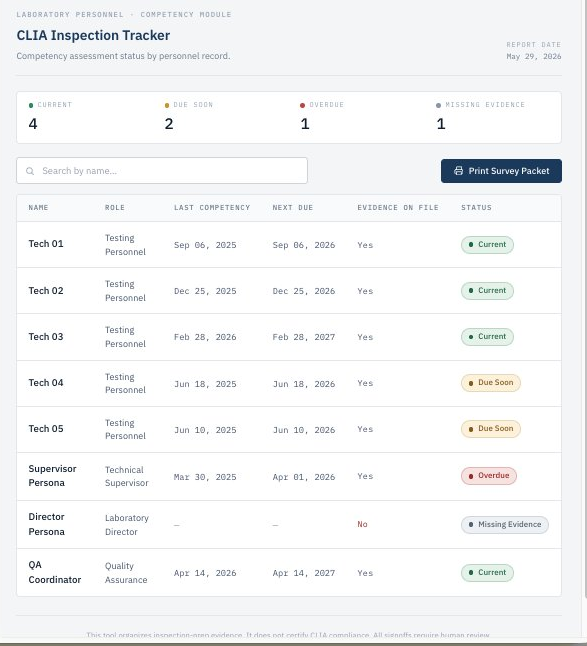
One screen, one source of truth, status readable at a glance — and a footer that says out loud what the tool does and doesn't do. Synthetic data only.
I built it the way anyone building their first lab tool would build it right now — small frontend, local data, no auth, no roles. The kind of thing a lab manager with a weekend and an AI assistant can ship for their own lab today.
The MVP solved exactly one thing the spreadsheet couldn't: a single source of truth that doesn't depend on whoever opened it last. People stopped arguing about whether a cert had lapsed and started arguing about what to do about the ones that had. That's progress.
But it surfaced what the spreadsheet had been hiding:
- No audit log = the same problem in a nicer wrapper. I could overwrite a record cleanly. I still couldn't prove the prior state.
- No roles meant I couldn't let a tech see their own profile without handing them the whole lab.
- No backup, no versioning, no inspection-mode view. A working tool, not a survey-ready system.
Lesson from V2: the gap between "working software" and "survey-ready software" isn't features. It's review history, ownership, and the confidence that a stranger can audit it without your help. That gap is way harder to cross than spreadsheet-to-MVP, and almost nobody talks about it.
Version 3 — The full local build
The third version ate the most time and is the one that actually points somewhere real. It's still local — it runs on my machine, on localhost — but it's a different animal. Multiple sections instead of one screen: a Personnel Roster, an Evidence Locker that flags anyone listed against a procedure with no evidence on file, a Competency Schedule, and an Inspector Walkthrough mode that lays the file out in the order an inspector actually asks for it. Every status is derived from human-entered facts, never stored as a judgment — so nothing in the data ever looks like the software "decided" you're compliant.
What changed from V2 to V3 wasn't really the UI. It was the architecture underneath: how data is owned, how it's reviewed, how it would survive being handed to a third party. That's the direction that matters.
And here's where I'll be straight with you, because the screenshot would say it too: the survey-readiness export in this build is still a stub. The button's there; the PDF generation is the next thing on the bench. I'm showing you a real build in progress, not a finished product with a bow on it. That's the honest state of it, and honestly it's the more useful thing to show — because the jump from "this demo" to "something a lab can actually run an inspection on" is the entire point.
Lesson from V3: at the production tier you're not selling software anymore. You're selling the confidence to walk into the inspection room and answer the question without going to look it up.
The actual lesson, across all three
Labs don't fail inspections because they lack software. They fail because the software they have can't produce a defensible answer fast enough, and the manual workarounds rot quietly between surveys.
What a lab actually needs from a personnel tracker isn't new. It's the same four things, in order:
- A single source of truth — the spreadsheet gets you partway.
- Readable status at a glance — the MVP gets you here.
- Traceability of every change — only the production tier gets you this.
- The confidence to hand the system to an inspector without your help — the whole point.
The first three are software problems. The fourth is the one labs actually pay for. And once you've built it the third way, you start designing the entire inspection workflow backward from that goal instead of patching it forward from the spreadsheet.
What would this actually cost you?
People always ask, so here are real 2026 numbers.
Build it yourself with AI: basically the cost of an AI subscription plus your own time. A weekend for the MVP. The hard part isn't the build anymore — it's knowing what a survey-ready system needs to do, which is exactly the part 15 years on the bench teaches you and a model can't.
Hire a freelancer to build a comparable tool: US freelance web developers run roughly $25–$150/hr in 2026, with solid mid-to-senior people around $73–$160/hr. A small custom web app typically lands between $2,000 and $10,000. But a production-grade version — real auth, role-based access, an immutable audit trail, regulatory-grade export — is a different project, and complex/enterprise builds routinely run $50,000–$100,000+ once you count the total cost of ownership (the cheap quote you refactor twice always ends up costing more than the right one).
Buy comparable SaaS: the clinical-lab compliance market — MediaLab Compass, StaffReady, MyInspection and friends — is almost entirely quote-based. Notice that none of them put a price on the public page. That's a tell. When pricing is "contact sales," it means "it depends on how much we think you'll pay."
Where I landed: the tool in these screenshots is the seed of what I'm building into LIMS BOX — a small, offline-capable lab system built on SENAITE (the leading open-source LIMS, originally created by RidingBytes GmbH). Survey-readiness is the whole design goal. It runs from $500/mo for small labs, with on-prem deployment, SSO, and the heavier compliance machinery at the top tier. No implementation fee, month-to-month, cancel anytime — because the 18-month enterprise contract is exactly the kind of thing I built this to kill.
(Figures current as of May 2026 and meant as ballpark, not gospel. SaaS comparables are quote-based, so treat those as illustrative.)
So if you've got an inspection coming up
Don't panic. List your evidence. List your personnel. List the roles and the competency items. List what's missing. Then point AI at it and let it build you a tracker.
Built with AI. Not dependent on AI. Just a useful tool for getting organized — and a starting point you can react to instead of a blank page you keep avoiding.
You still validate it. You still document it. Your lab director still owns every sign-off. The tool organizes the evidence; it never replaces the judgment — and that line holds whether you built it in a weekend or paid six figures for it.
Here's the thing I want to know: I've got the full screen-recording of all three builds cued up — the prompts, the build progression, the run-it-yourself walkthrough, the whole thing. I'm a little shy about putting my face on camera, so I'm going to let the comments decide.
If you want the video tutorial — the one where you follow along and build your own CLIA tracker step by step — say so below. Enough interest and I'll record it and ship it. Drop a comment, tell me your stack, tell me what your lab struggles with most. That's how I'll decide whether to hit record.
Hud Taylor has spent 15 years building LIMS for public health and clinical labs, most recently architecting the State of Alaska's public health LIMS — 5.3 million test results a year, 780K+ samples, 50+ lab instruments. Now building LIMS BOX, the small, survey-ready lab system that doesn't need an IT department. → lims.bot
Related Posts
5 Signs Your Lab Has Outgrown Spreadsheets
Spreadsheets got your lab started, but they can't scale with you. Here are 5 unmistakable signs it's time to move to a real LIMS — before your next audit forces the decision.
Lab Software Your Analysts Will Actually Use: Lessons from Don't Make Me Think
Most lab software fails quietly: people work around it. Steve Krug's classic usability book explains why, and gives small labs a cheap way to pick and set up software people keep using.
LIMS BOX Launch: Real Tools for Real Labs
We built LIMS BOX because small labs shouldn't have to choose between $500k enterprise software and spreadsheets. Personnel Pack is live, CLIA tracker is published, and lims.bot is open for early adopters.